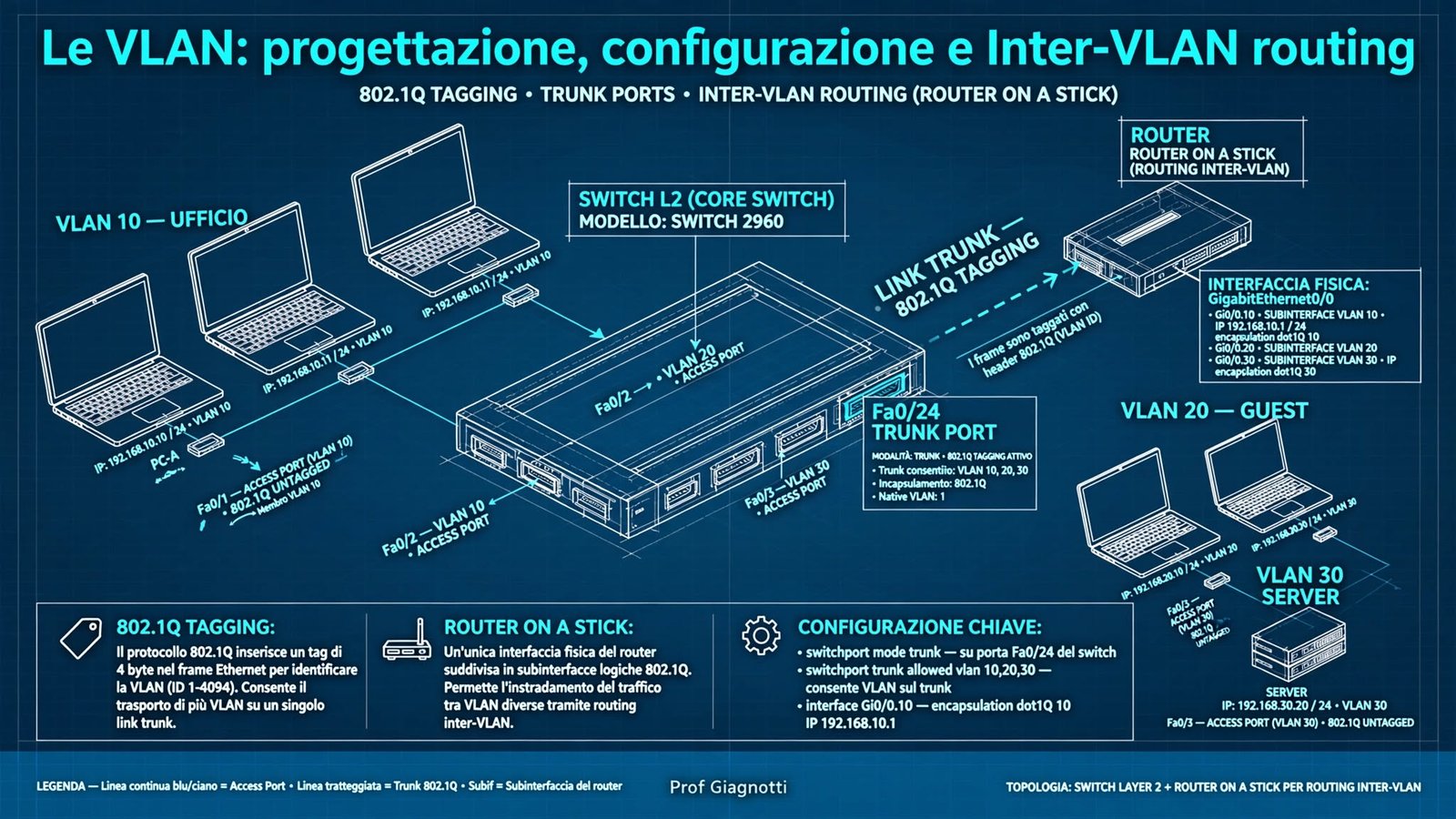
VLAN: progettazione, configurazione e inter-VLAN routing
Segmentazione logica della LAN, tag 802.1Q, porte access e trunk, native VLAN, DTP, configurazione Cisco e tre tecniche di inter-VLAN routing: tradizionale, Router-on-a-Stick e SVI su switch L3.
- Perché segmentare con le VLAN
- Standard 802.1Q: tag, TPID e TCI
- Porte Access vs Trunk, native VLAN e DTP
- Configurazione VLAN base su Cisco
- Inter-VLAN routing tradizionale
- Router-on-a-Stick
- SVI e routing inter-VLAN su switch L3
- Confronto tra i tre approcci
- Sicurezza: VLAN hopping e hardening
- Riepilogo e laboratori
1. Perché segmentare con le VLAN
Una VLAN (Virtual LAN) è una segmentazione logica di uno switch: anche se gli host sono collegati allo stesso hardware, il traffico broadcast di una VLAN non raggiunge mai un'altra VLAN. È come avere switch virtuali separati.
VLAN = dominio broadcast logico. Stessa VLAN = L2 diretto. VLAN diverse = serve un router/L3 per comunicare, anche se sono sullo stesso switch fisico.
Ogni VLAN limita broadcast, ARP e storm a un sottoinsieme di porte. Migliora prestazioni e stabilità con STP.
Reparti, ospiti, VoIP, IoT isolati a L2. Politiche ACL applicate solo al traffico inter-VLAN su router/firewall.
Un utente sposta PC in altro piano ma resta in VLAN 20. Nessun ricascablaggio, solo riconfigurazione porta access.
Senza VLAN avresti bisogno di uno switch fisico per reparto. Con 4 reparti e 3 piani = 12 switch. Con VLAN ne bastano 3, uno per piano, con 4 VLAN ciascuno.
2. Standard 802.1Q: tag, TPID e TCI
Per trasportare più VLAN su un singolo cavo serve un'etichetta. IEEE 802.1Q inserisce 4 byte tra Source MAC e EtherType/Type.
| Campo | Bit | Significato | Esempio |
|---|---|---|---|
| TPID | 16 | Tag Protocol Identifier, indica frame tagged = 0x8100 | 0x8100 |
| PCP | 3 | Priority Code Point - QoS L2 (0-7) per voce/video | 5 per VoIP |
| DEI | 1 | Drop Eligible, se 1 frame scartabile in congestione | 0 default |
| VID | 12 | VLAN Identifier: identifica VLAN (0 e 4095 riservati) | 10, 20, 99 |
VID = 12 bit → 4096 VLAN teoriche (0-4095) ma VLAN 0 = priority tag only, VLAN 4095 riservata. Utili: 1-1001 normal-range, 1002-1005 legacy Token/FDDI, 1006-4094 extended. Native VLAN di default = 1 su Cisco.
3. Porte Access vs Trunk, native VLAN e DTP
Uno switch ha due personalità per porta:
| Caratteristica | Access | Trunk (802.1Q) |
|---|---|---|
| Collega a | PC, stampante, AP, telefono | Altro switch, router, switch L3, hypervisor |
| VLAN trasportate | 1 sola (untagged) | Molte (tagged), più native untagged |
| Frame in uscita verso host | Senza tag (rimosso all'egress) | Con tag, tranne native VLAN |
| Configurazione tipica | switchport mode access + switchport access vlan 10 | switchport mode trunk + switchport trunk allowed vlan 10,20,30 |
Telefono IP con PC a cascata: porta access con switchport access vlan 10 per dati + switchport voice vlan 30 per VoIP. Due VLAN sulla stessa porta: dati untagged + voce tagged.
Native VLAN e DTP
Su un trunk 802.1Q i frame della native VLAN viaggiano senza tag per compatibilità. Cisco usa di default VLAN 1. Per sicurezza va cambiata in VLAN dedicata inutilizzata (es. 999).
DTP (Dynamic Trunking Protocol) negozia automaticamente access/trunk. Pericolo: un attaccante può negoziare trunk e vedere tutte le VLAN (VLAN hopping). Best practice: disabilitare DTP con switchport nonegotiate e impostare manualmente mode.
4. Configurazione VLAN base su Cisco
Workflow standard: creare VLAN → nome → assegnare porte access → verificare → configurare trunk verso altri switch.
show vlan brief = VLAN esistenti e porte access. show interfaces trunk = trunk attivi, native, allowed. show mac address-table vlan 10 = MAC appresi in VLAN 10. Se host non comunica nella stessa VLAN → porta in VLAN sbagliata o access/trunk invertito.
PC invia frame senza tag. Switch aggiunge VID interno alla porta (PVID). In uscita verso altra porta access stessa VLAN → tag rimosso. Ideale per lab VLAN-untagged.pkt.
Switch mantiene tag tra switch. Host non vedono tag perché rimosso su porte access. Tra due switch: 10 e 20 tagged sullo stesso cavo. Vedi lab VLAN-tagged.pkt e VLAN-STP.pkt con ridondanza.
5. Inter-VLAN routing tradizionale
Due VLAN non parlano a L2. Per far comunicare 192.168.10.0/24 con 192.168.20.0/24 serve L3.
Metodo 1 — router con una interfaccia fisica per VLAN: N VLAN = N porte fisiche su router + N link verso switch. Semplice ma non scala: spreco di porte, cavi, costo.
Apri Inter-VLAN-tradizionale.pkt e Inter-Vlan-tradizionale2.pkt: ping tra VLAN fallisce senza gateway, funziona configurando IP router e default-gateway su PC.
6. Router-on-a-Stick (ROAS)
Un solo link fisico tra switch e router diventa trunk. Sul router si creano subinterface logiche: g0/0.10 per VLAN10, g0/0.20 per VLAN20. Ogni subinterface fa tagging 802.1Q in uscita e untagging in entrata.
Dimenticare no shutdown sull'interfaccia fisica g0/0 → subinterface up ma line protocol down. Encapsulation deve corrispondere esattamente a VLAN permessa su trunk. Ordine: prima encapsulation dot1q poi ip address.
Verifica ROAS con Router-on-a-stick.pkt e Router-on-a-stick2.pkt + video ROAS.
7. SVI e routing inter-VLAN su switch L3
Negli scenari enterprise si usa uno switch multilayer L3: routing in hardware ASIC a velocità di linea, non più bottleneck su singolo link router.
Una SVI (Switched Virtual Interface) è un'interfaccia logica Vlan10 con IP che fa da gateway per quella VLAN. ip routing abilita il motore L3.
Routing tra SVI avviene nella fabric dello switch, senza uscire su cavo. Throughput decine di Gbps, latenza microsecondi, possibile routing dinamico OSPF tra distribution e core. Modello gerarchico: access L2 + distribution L3 con SVI.
8. Confronto tra i tre approcci
| Metodo | Hardware | Prestazioni | Scalabilità | Uso tipico |
|---|---|---|---|---|
| Interfacce fisiche | Router + N porte + N cavi | Media | ❌ Scarsa, max porte | Lab, legacy, 2-3 VLAN |
| ROAS | Router + 1 link trunk 802.1Q | Media (bottleneck 1 link) | ✅ Buona ≤ 10 VLAN traffico moderato | PMI, sedi piccole |
| SVI (L3) | Switch L3 (3560, 3650, 9300) | ✅ Molto alta (ASIC) | ✅ Ottima centinaia VLAN | Enterprise, Campus |
9. Sicurezza: VLAN hopping e hardening
Switch spoofing: attaccante manda DTP desirable → porta diventa trunk → vede tutte le VLAN. Double tagging: sfrutta native VLAN: 1° tag = native, 2° tag = vittima, switch1 rimuove native e inoltra tag interno a vittima. Contromisure sotto.
| Minaccia | Contromisura obbligatoria | Comando |
|---|---|---|
| DTP spoofing | Disabilita DTP, mode statico | switchport nonegotiate + mode access/trunk |
| Native VLAN double tag | Cambia native a VLAN inutilizzata, tag anche native | switchport trunk native vlan 999 + vlan dot1q tag native |
| Porte non usate | Shutdown + VLAN blackhole | shutdown + switchport access vlan 998 |
| VLAN 1 default | Non usare VLAN 1 per dati, sposta management | Crea VLAN 99 management |
10. Riepilogo, punti chiave e laboratori
vlan X, name, switchport access vlan, mode trunk, allowed vlan, verifica con show vlan brief / show interfaces trunk.encapsulation dot1q + IP. SVI = interface vlan X + ip routing su L3.